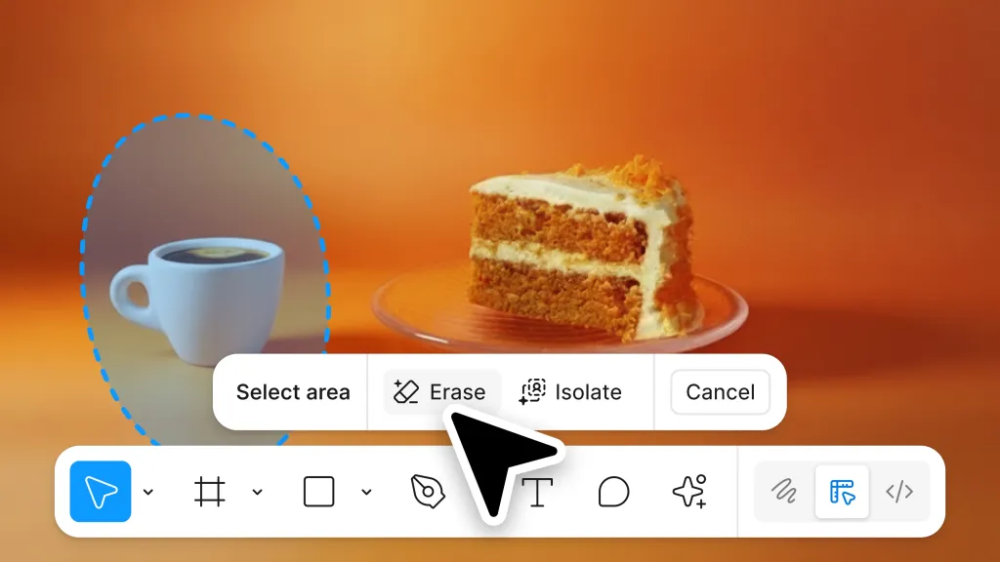
Figma today introduced new image editing features. Users can now remove objects, isolate objects, and enlarge images. The company says these tools eliminate the need to export images to other programs and then return.
Thanks to the improved lasso tool, users can select and move objects and change parameters such as light, shadow, color, and focus. The new image enlargement function simplifies design work in banners and other formats, allowing you to automatically fill in the background and other details.
Figma has combined all of its editing tools into a single panel. Users can use this panel to change the background color, select objects, and add annotations and text. The company says that background removal is one of the most used functions on the platform, which is why it has a special place in the panel.
Competitors Adobe and Canva have long offered similar features, but Figma is now catching up with them in this area. The new capabilities are already available in Figma Design and Draw, and will be added to other Figma tools in 2026.
On the same day, Adobe also introduced some similar features to users within ChatGPT. Figma previously partnered with ChatGPT in October, but it is not yet known whether the new tools will be made available through OpenAI.